Documentation
/autothread edit
Default Permissions: Administrator
/autothread edit
Default Permissions: Administrator
Description
By using the /autothread edit command, you can edit the autothreading settings of a channel. This command is useful if you want to change the settings of an existing autothreading channel without having to disable and re-enable it.
Options
- channel: The channel to edit autothreading settings for. (required)
- name: The name for the created threads. (optional)
- threadmessage: The message you want to send in the created threads. (optional)
- pin-threadmessage: Whether to pin the threadmessage sent in the thread, if set (optional)
- delay: The delay in seconds to wait before the thread is being created. Maximum delay is 10 seconds (optional)
- cooldown: The chat cooldown in seconds in the created in threads (optional)
- require-attachment: Whether the thread should only be created if the message contains an attachment (optional)
- ignorebots: Whether to ignore messages by apps (optional)
- ignoreusers: Whether to ignore messages by users (optional)
- lock-thread: Whether to lock the thread right after creation. This will only allow moderators to send messages in the thread (optional)
- archive-time: The time of inactivity after which the thread will be closed/archived (optional)
- private: Whether the automatically created thread should be private or not. Default: false (optional)
- block-invites: If this and the private option is enabled, this will disable the ability of normal members to add users to the thread by pinging them (optional)
- sticktomessage: If enabled, the autothread of a message will automatically be removed once the message got deleted. (optional)
- ignore-replies: Whether to ignore replies to other messages in the channel (optional)
Variables
- {message}: The first 50 characters of the message trigerring the autothreading
- {firstline}: The first line of the message trigerring the autothreading
- {embedtitle}: The title of the embed in the message trigerring the autothreading
- {filename}: The name of the first provided file. If no file is provided it will be "No File Name
- {user}: The username of the user sending the message
- {usernickname}: The nickname/display Name of the user triggering the autothreading
- {usermention}: This will mention the user triggering the autothreading
- {guild}: The name of the server
- {newline}: This will start a new line in messages sent by the app
- {time}: This will be replaced with the current time. Default timezone is UTC, it can be changed guild-specific with the /timezone command.
- {date}: This will be replaced with the current date. Default timezone is UTC, it can be changed guild-specific with the /timezone command.
Examples
Introduction Channel:
/autothread edit channel:#introduction name:{user}`s introduction threadmessage:Hey {usermention},{newline}Your introduction seems pretty cool :) Maybe some of us share the same hobbies as you...
This will edit autothreading in the channel #introduction with the name "{user}'s introduction".
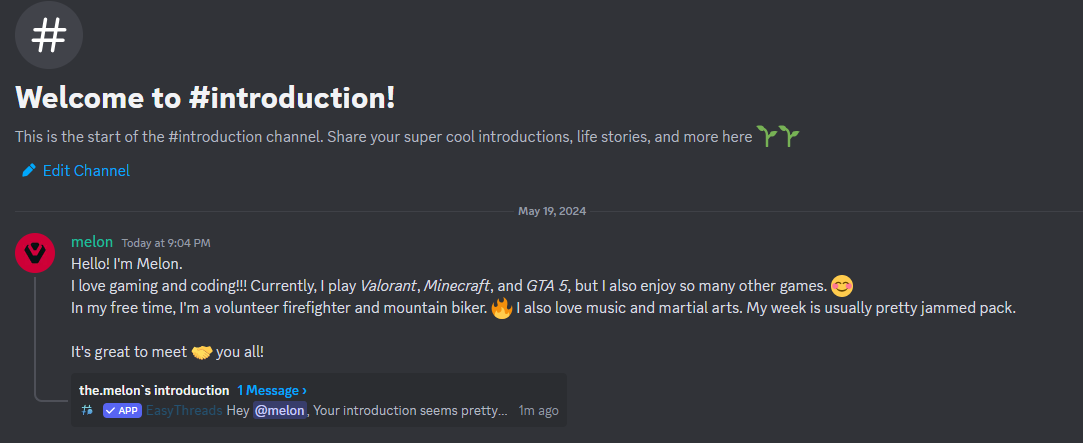
And will send this message in the created Thread:
Hey < The User will be pinged here >,
Your introduction seems pretty cool :) Maybe some of use share the same hobbies as you...".